
I thought the following line of code would make the job.
$HastTable2 = $HastTable1
However, despite at first glance it works fine, it has some unexpected consequences: both objects are now bound and any changes made to one of them is also made to the other one.
To convince you, try the following script which does followings:
- Create a hashtable WeatherNY
- Executes the line
$WeatherLA = $WeatherNY - Add the value Humidity to hashtable WeatherNy
- Add the value Wind to hashtable WeatherLA
- Display the content of both hashtables
$WeatherNY =@{
SkyColour = 'Blue'
Temperature = 90
}

$WeatherLA = $WeatherNY

$WeatherNY.Add('Humidity',30)

$WeatherLA.Add('Wind',14)

"`n`rWeather NY"
$WeatherNY

"`n`rWeather LA"
$WeatherLA
As you can notice in the output, both objects contain the same values.
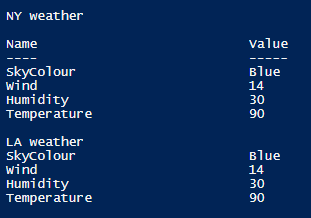
In fact, in this case, I had to use the Clone method and replace the line
$WeatherLA = $WeatherNY
with this one
$WeatherLA = $WeatherNY.Clone()
Here is the final output

More about
Powershell: Everything you wanted to know about hashtables (Kevin Marquette)
 itluke.online