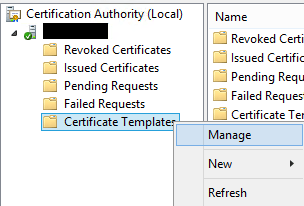
Written by LukeDecember 5, 2017December 5, 2017 How to open the Certificate Templates console Open the Certification Authority console Right-click the Certificate Templates folder and select Manage. Share this: Email a link to a friend (Opens in new window) Email Share on X (Opens in new window) X Share on LinkedIn (Opens in new window) LinkedIn Share on Reddit (Opens in new window) Reddit Share on Facebook (Opens in new window) Facebook Share on WhatsApp (Opens in new window) WhatsApp Print (Opens in new window) Print Like Loading... Related Leave a comment Cancel reply

 itluke.online